Stop chasing invoices.
Get paid automatically.
Connect QuickBooks. PayTime finds your overdue invoices and sends professional, escalating email reminders until your clients pay.
No credit card required. Set up in under 2 minutes.
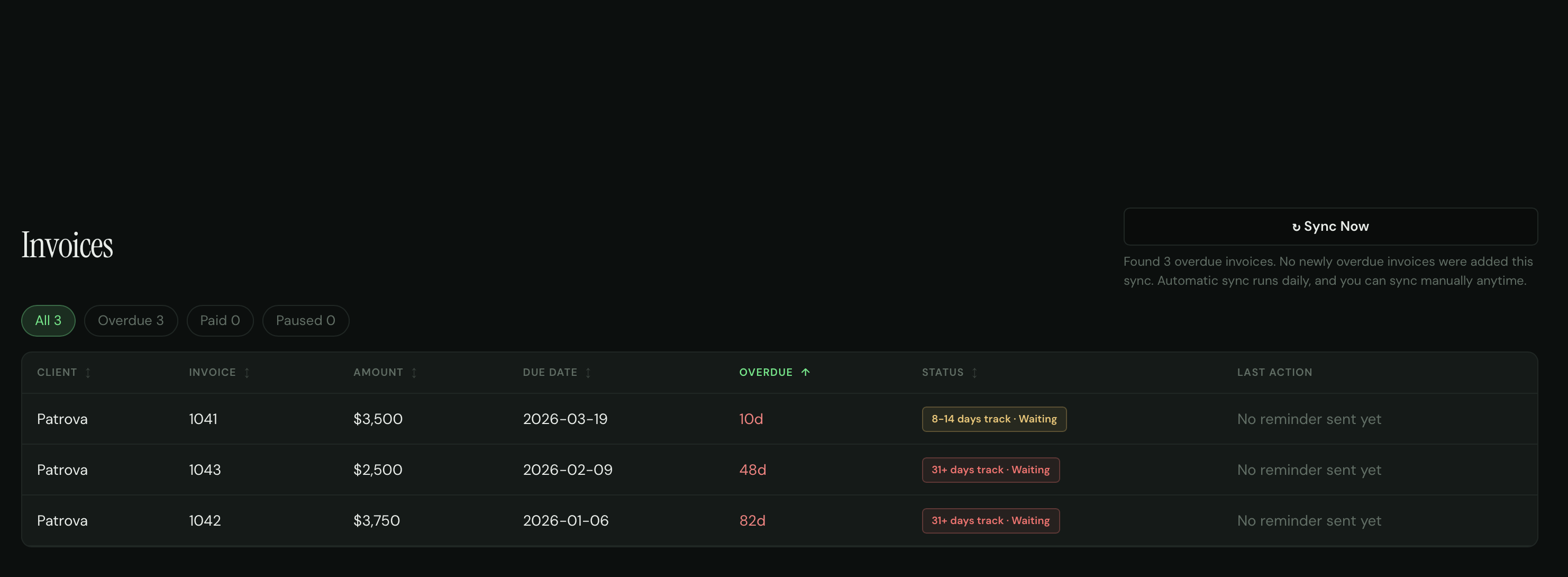
 PayTime dashboard
Trusted by small businesses across the US
How it works
Set up in 2 minutes. Get paid on autopilot.
Connect QuickBooks
One click OAuth. We import your invoices, contacts, and due dates automatically.
See your overdue total
Instantly see how much money is sitting unpaid. The "aha" moment that sells itself.
Turn on reminders
Use our proven 4-step sequence or customize your own. Reminders go out automatically.
Default Reminder Sequence
Escalating reminders that get results. Customize timing and tone for your business.
- 1
Day 1 — Friendly Subject: Friendly reminder: Invoice #{{number}} is due
Hi {{client_name}}, Just a quick reminder that invoice {{number}} for {{amount}} was due on {{due_date}}. If you've already sent payment, please disregard this note. Thanks, {{business_name}} - 2
Day 7 — Firm Subject: Invoice #{{number}} is 7 days overdue
Hi {{client_name}}, Invoice {{number}} for {{amount}} is now 7 days past due. Please arrange payment at your earliest convenience. Best regards, {{business_name}} - 3
Day 14 — Urgent Subject: Second reminder: Invoice #{{number}} — please pay immediately
Hi {{client_name}}, This is our second reminder regarding invoice {{number}} for {{amount}}, now 14 days overdue. Please process this payment immediately. {{business_name}} - 4
Day 30 — Final Subject: Final notice: Invoice #{{number}} — 30 days overdue
{{client_name}},

Invoice {{number}} for {{amount}} is 30 days past due. If we do not receive payment by {{escalation_date}}, we will need to escalate this matter.

{{business_name}}
Features
Everything you need. Nothing you don't.
Emails that look personal
Sent from your business name. Replies go to your inbox. No PayTime branding. Your clients won't know it's automated.
Smart escalation
Friendly → Firm → Urgent → Final. Tone gets progressively serious. You control the timing and copy for each step.
Auto-pause on payment
When an invoice is marked paid in QuickBooks, reminders stop instantly. No awkward emails after payment.
Real-time dashboard
See total overdue, recovery progress, and activity feed. Know exactly where every invoice stands.
Activity feed
Chronological log of every reminder sent, opened, and replied to. Full visibility into your collection efforts.
Works while you sleep
Set your sequence once. PayTime runs 24/7, checking for overdue invoices and sending reminders automatically.
Recent Activity
Live from your dashboard- Johnson Homes paid INV-1042 — $4,5002 hours ago
- Reminder #2 sent to Riverside HOA for INV-10384 hours ago
- Reminder #1 sent to Park View Apts for INV-10446 hours ago
- Metro Commercial paid INV-1033 — $3,100Yesterday
- Summit Corp INV-1030 paused — dispute filedYesterday
Pricing
Simple pricing. No surprises.
No per-seat pricing. No per-action billing. Flat rate, unlimited invoices.
Free
$0
3 invoices/month forever
- ✓ Connect QuickBooks
- ✓ Automated reminders
- ✓ Dashboard & activity feed
- ✓ No credit card required
Pro
$99
per month · or $79/mo annual
- ✓ Unlimited invoices
- ✓ Unlimited contacts
- ✓ Custom sequences
- ✓ Priority support
Why PayTime over the alternatives?
| PayTime | Paidnice | Manual | |
|---|---|---|---|
| Setup time | 2 minutes | ~15 minutes | N/A |
| Pricing | $99/mo flat | From $39 (volume) | Free |
| Free tier | Forever (3 inv) | 20-action trial | — |
| Emails look personal | Yes | Yes | Yes |
| Auto-pause on payment | Yes | Yes | No |
| Time spent per week | 0 min | ~10 min | 3-5 hours |
FAQ
Questions owners usually ask before they start
When should I use PayTime?
If you have at least $1,000 in overdue invoices, PayTime is usually worth trying. At that point, recovering even one or two invoices can easily cover the subscription, and it usually means you are already spending too much time manually following up.
What are the chances of getting paid after I use PayTime?
No one can honestly promise a fixed recovery rate, because results depend on the client, the amount, and how old the invoice already is. But the timing data is clear: according to Debitura, once an invoice is 30 days late, the probability of being paid can drop below 70%, and after 90 days it can fall below 15%. That is why PayTime is built to follow up early, consistently, and without invoices slipping through the cracks. Read the research
Will this hurt my relationship with clients?
That is one of the main things PayTime is designed to avoid. The emails are written to sound like calm, professional follow-ups from your business, not aggressive collection notices. Early reminders stay polite, and the tone only becomes firmer when an invoice has been overdue for much longer.
What if an invoice is already very overdue?
PayTime does not start every invoice with the same message. If something is only a few days late, it starts in a softer track. If it is already weeks overdue, it starts with a more direct first email so you do not lose more time sending reminders that are too gentle for the situation.
What if the client says they cannot pay right now?
That is still useful. In many cases, the goal of follow-up is not just to get an immediate payment, but to get a clear answer. A reply with a real payment date, a request for a payment plan, or a billing issue is much better than silence.
Do I need to change how I invoice or collect payments?
No. You keep invoicing in QuickBooks, and PayTime handles the follow-up layer after something becomes overdue. You do not need to rebuild your billing process to start using it.
Your clients owe you money.
Let PayTime collect it.
Connect QuickBooks, see your overdue total in 30 seconds, and turn on automatic reminders. No credit card required.
Start free — takes 2 minutes